What is Sitecore upgrade?
When the Sitecore instance running in backend of website is updated from an old version to a new or latest version, it is termed as Sitecore upgrade. Example: Updating Sitecore Version 7.2 to Version 9.2
Testing Approach
Below steps provide an effective quality assurance approach to test the Sitecore Upgrade projects:
Step 1: Instead of testing individual Sitecore components, test the Core Sitecore functionalities which are given below:
- Create new item/Edit item/Delete item.
- Workflow states
- Preview and Publishing
- Experience Editor
- Sitecore Searches
- Experience Analytics
- Personalization Rules
- Rebuild Indexes
- 404 Error Pages
Step 2: Test all the Sitecore Modules that are in scope of the project. Below are few commonly used modules list:
- Forms
- Sitemap
- URL Rewrite
- PowerShell Extensions
- 301 Redirects
- Active Directory
Step 3: If there are any third-party integrations like Live Chat, Imports etc., test them. Seek developer’s help to get all the integrations list.
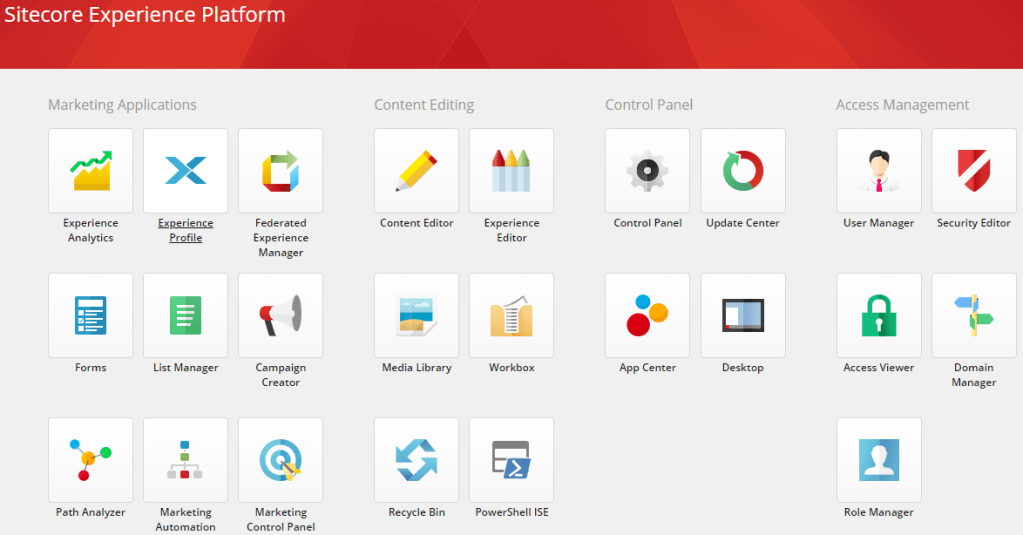
Step 4: It is best practice to click all the icons once on Sitecore Launchpad to verify that they are not broken and showing error.
Step 5: Front end testing of website need not comprise of bunch of desktop browsers and devices. Select one browser and device to verify UI. Example: IE11 and Iphone X. However, front end testing need to include all the sections and sub sections of website covering maximum number of pages.
Step 6: Use XENU, Brokenlinkcheck or any other tool to check the broken links of website.
Step 7: Last but not least, do a high-level performance testing to ensure that upgrade has not resulted in poor response time of pages.
 Ritesh's Blogs